
How to Set Default Utility Settings in Tenant Settings
Set Default Utility Settings in Tenant Settings
You can now enable or disable specific utilities such as electricity, water, and gas by default and set required utilities for tenants. This new feature will save you time and reduce manual work.
What does it mean to disable a utility by default?
This means that any new address synced to utility profit will not prompt the tenant to set up that disabled utility. For example, if your properties do not need gas to be set up by tenants you can disable that by default. If you know of the few that do require it, then you’ll need to manually update those.
How it works:
To get started, navigate to your Settings page.

Click on the Tenant Settings button, which will take you to the tenant settings landing page where you can manage utilities, notes, and more.
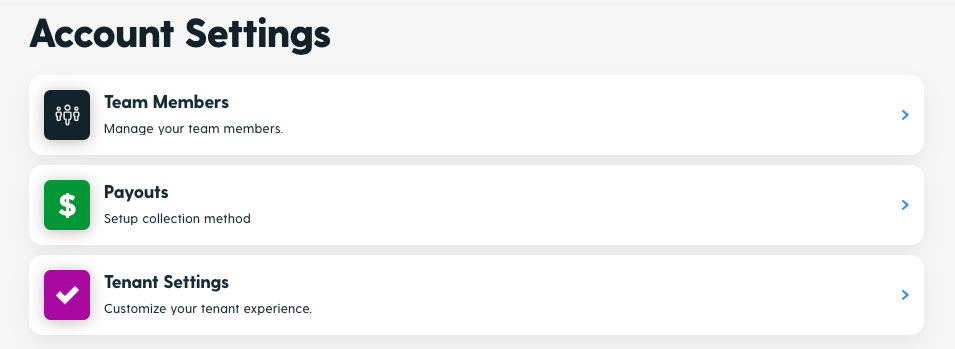
On the Tenant Settings page, you’ll find a new table titled Enable or Disable Utilities by Default.
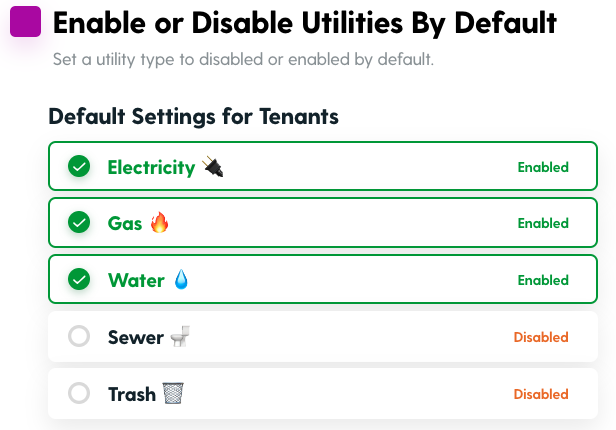
In this section, you can manage which utilities are enabled or disabled by default for tenants to set up. Click on the enabled/disabled button and then click save.